
ShiftApp
Start free trial
21 days free. No card needed.
Shift Agreements: Staff Accept or Decline
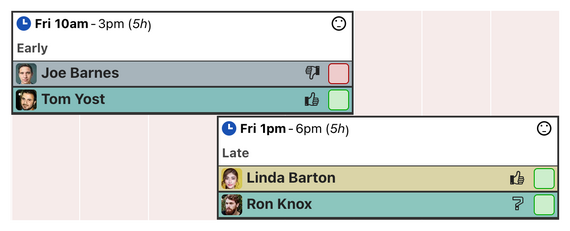
After you assign a shift, the employee can mark it as accepted. If you allow it, they can also decline it.
The schedule shows which shifts have been accepted, so you can see at a glance who has seen their shifts.
Use it your way
- Ask staff to accept every shift you assign, so you know they have seen it.
- Allow declines, and rearrange cover when someone can't work a shift.
- Before a shift is assigned, let staff mark it as one they are willing, or reluctant, to work, with shift interest.
- Choose whether staff can see each other's agreements, or only managers.
- Turn shift agreements off in the workforce settings if you don't need them.